
How Wi-Fi password cracking works: WPA2, WPA3 and Aircrack-ng walkthrough for 2026

Article content
Update note: Originally published in 2022, this article has been updated and expanded by additional contributors to reflect current WPA2 and WPA3 security, Aircrack-ng workflows and Wi-Fi protections.
Long, random and unique passwords are difficult to crack. Unfortunately, people often choose Wi-Fi passwords made from familiar words, names, dates and predictable number patterns.
In this Cyber Work Applied demonstration, Mike Meyers shows how an intentionally weak WPA/WPA2-Personal password can be identified in an authorized lab using Airodump-ng, Aircrack-ng and a password wordlist.
The important point is not that WPA2 encryption can always be broken. The demonstration succeeds because the network uses a weak password that appears in the supplied wordlist. A sufficiently long and unique passphrase can make this kind of password-guessing attack impractical.
Authorized use only: Perform wireless security testing only in an isolated environment you own and fully control or under explicit written authorization with a clearly defined scope. Do not capture or test traffic from unrelated users, devices or networks.
Put this Wi-Fi security lesson into practice
Start learning the skills in this roadmap with our free hacking workshop. Get guided, hands-on practice in an environment designed for safe and legal security training.
FREE role-guided training plans
What this Wi-Fi password demonstration shows
This walkthrough covers a dictionary-based password test against an intentionally vulnerable WPA/WPA2-Personal lab network.
At a high level, the process involves:
- Identifying the authorized lab access point.
- Capturing authentication traffic from a client connection.
- Saving the captured traffic to a file.
- Testing candidate passwords from a wordlist against the capture.
- Recovering the password only if the correct candidate appears in that wordlist.
The password is not simply extracted from the wireless packets. Instead, the captured authentication data gives Aircrack-ng a way to determine whether each password guess is correct.
This distinction makes a difference. A weak password, such as a repeated dictionary word, may be found quickly. A long, unique and unpredictable passphrase may remain challenging to discover, even when an attacker has captured the necessary authentication traffic.
How WPA and WPA2-Personal security works
Video timestamp: 0:00–0:24
WPA and WPA2 were introduced to improve on the serious weaknesses of WEP.
Original WPA commonly used the Temporal Key Integrity Protocol, or TKIP, with the RC4 stream cipher. WPA2 introduced stronger protection through AES-based Counter Mode with Cipher Block Chaining Message Authentication Code Protocol, usually abbreviated as CCMP.
For current networks, TKIP should be considered obsolete. WPA2 deployments should use AES-CCMP, while compatible networks should prefer WPA3.
The attack demonstrated in this article does not mathematically break AES encryption. It targets a different part of the system: a weak human-selected pre-shared key.
What is the WPA four-way handshake?
Video timestamp: 0:25–1:35
When a client joins a WPA or WPA2 network, the client and access point perform a four-way handshake.
The handshake confirms that both sides possess the necessary key material and establish encryption keys for the connection. The Wi-Fi password itself is not transmitted over the air during this exchange.
However, authentication data captured during the handshake can be used to verify password guesses offline. An attacker who has an appropriate capture can test candidate passwords without repeatedly attempting to log in to the access point.
Think of the process as testing combinations against a lock for which the attacker has obtained a reliable pass-or-fail check. The captured handshake does not reveal the combination, but it can indicate when the right combination has been tried.
For that reason, the size and quality of the candidate-password list make an enormous difference.
Why weak Wi-Fi passwords are vulnerable
Video timestamp: 1:36–2:15
People rarely create truly random passwords.
Instead, they often use:
- Names of family members or pets
- Familiar words or phrases
- Birth years and anniversaries
- Keyboard patterns
- A word followed by a number
- The same password they use elsewhere
- A short word repeated twice
Attackers incorporate patterns like these into password wordlists and cracking rules.
Rather than testing every possible combination of letters, numbers and symbols, a password-testing tool begins with the choices people are statistically more likely to make. That can dramatically reduce the amount of work required to find a weak password.
A long, unique passphrase selected independently of personal information is far less likely to appear in a standard wordlist.
What is a password wordlist?
Video timestamp: 2:16–3:07
A password wordlist, sometimes called a dictionary file, is a text file containing candidate passwords. Depending on its purpose, a wordlist may include:
- Common passwords
- Dictionary words
- Names and phrases
- Predictable substitutions
- Dates and number patterns
- Previously exposed passwords
- Variations generated from password rules
Aircrack-ng can test each candidate against captured WPA/WPA2-Personal authentication data.
A large wordlist may contain millions of candidates, but size alone does not guarantee success. The correct password must either appear in the list or be generated by the rules used during the test.
Key point: A dictionary attack does not guarantee that a password will be recovered. It succeeds only when the correct password is included in the candidate search space.
Setting up the authorized Wi-Fi security lab
Video timestamp: 3:08–4:26
For the demonstration, Mike configures a wireless access point as an intentionally vulnerable WPA-Personal network.
The lab network uses:
- SSID: NOTSECUREWPA
- Security: WPA-Personal
- Demonstration password: timmytimmy
The password is intentionally weak. It consists of a common name repeated twice and is included in the demonstration wordlist so the result can be shown within the video’s running time.
A real security assessment should document the scope of authorization before testing begins. The lab should also be isolated from production systems and unrelated wireless clients.
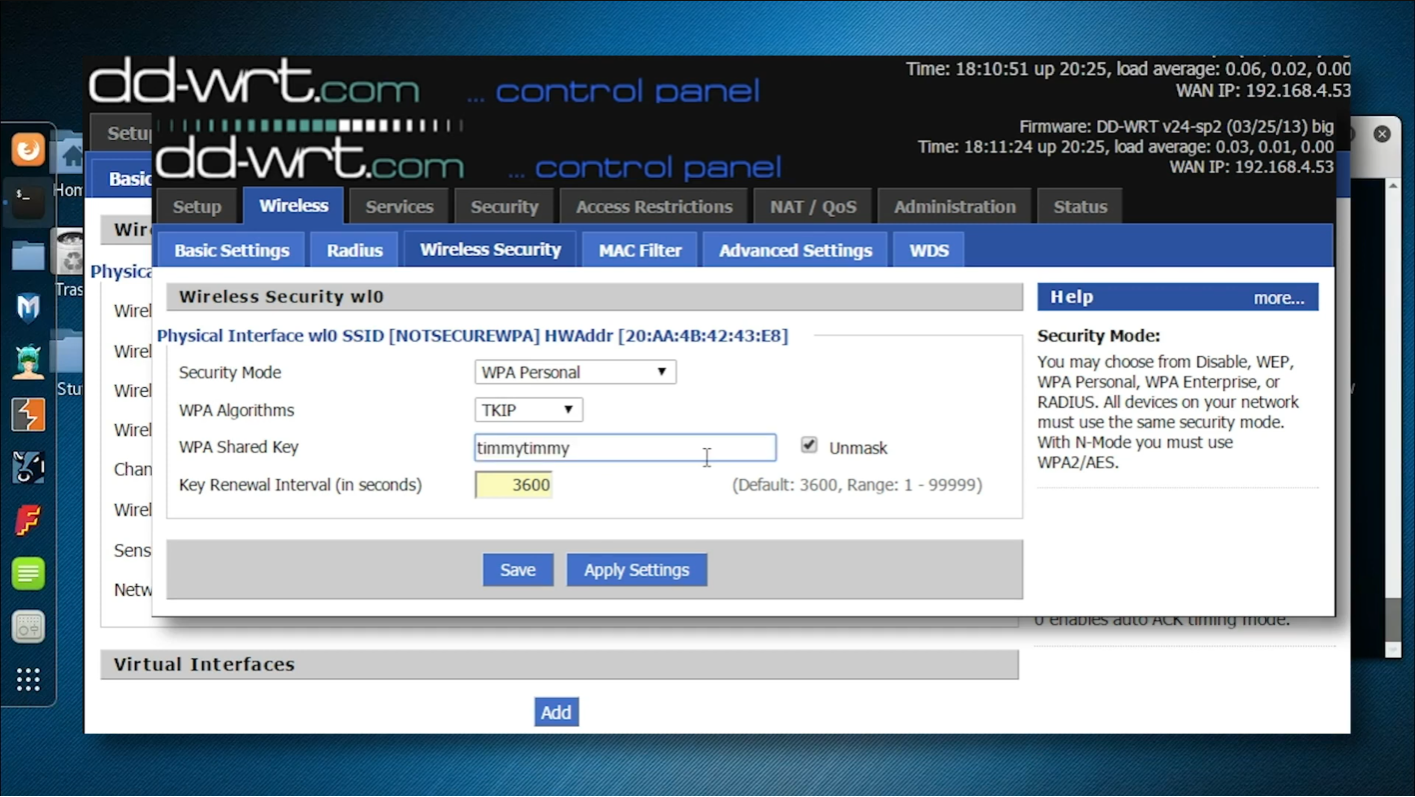
The authorized lab access point is configured with an intentionally weak WPA-Personal password.
Step 1: Identify the authorized access point
Before beginning a focused capture, the tester must identify the authorized lab network’s basic details, including its:
- SSID
- BSSID
- Channel
- Encryption method
- Authentication type
Airodump-ng is part of the Aircrack-ng suite and is used to capture raw IEEE 802.11 wireless frames. It can also display nearby access points and save WPA handshake data for later analysis with Aircrack-ng.
In the demonstration, the relevant values are:
- BSSID: 20:AA:4B:42:43:E8
- Channel: 6
- Monitor-mode interface: wlan0mon
Step 2: Capture the WPA/WPA2 handshake with Airodump-ng
Video timestamp: 4:27–6:29
After identifying the access point, the demonstration starts a focused Airodump-ng capture:
airodump-ng --write wpafile \
  --channel 6 \
  --bssid 20:AA:4B:42:43:E8 \
  wlan0mon
The command itself is valid, but the displayed line-continuation characters could fail if spacing or HTML formatting changes during publication.
Command reference
airodump-ng: Starts the wireless packet-capture tool.
--write wpafile: Writes captured data to files beginning with the name wpafile.
--channel 6: Keeps the wireless adapter focused on channel 6.
--bssid 20:AA:4B:42:43:E8: Limits the capture to the authorized lab access point.
wlan0mon: Specifies the wireless adapter’s monitor-mode interface.
Depending on the Airodump-ng version and output options, the process may create files such as:
wpafile-01.cap
wpafile-01.csv
wpafile-01.kismet.csv
The .cap file contains the captured wireless frames that will be examined during the password test.
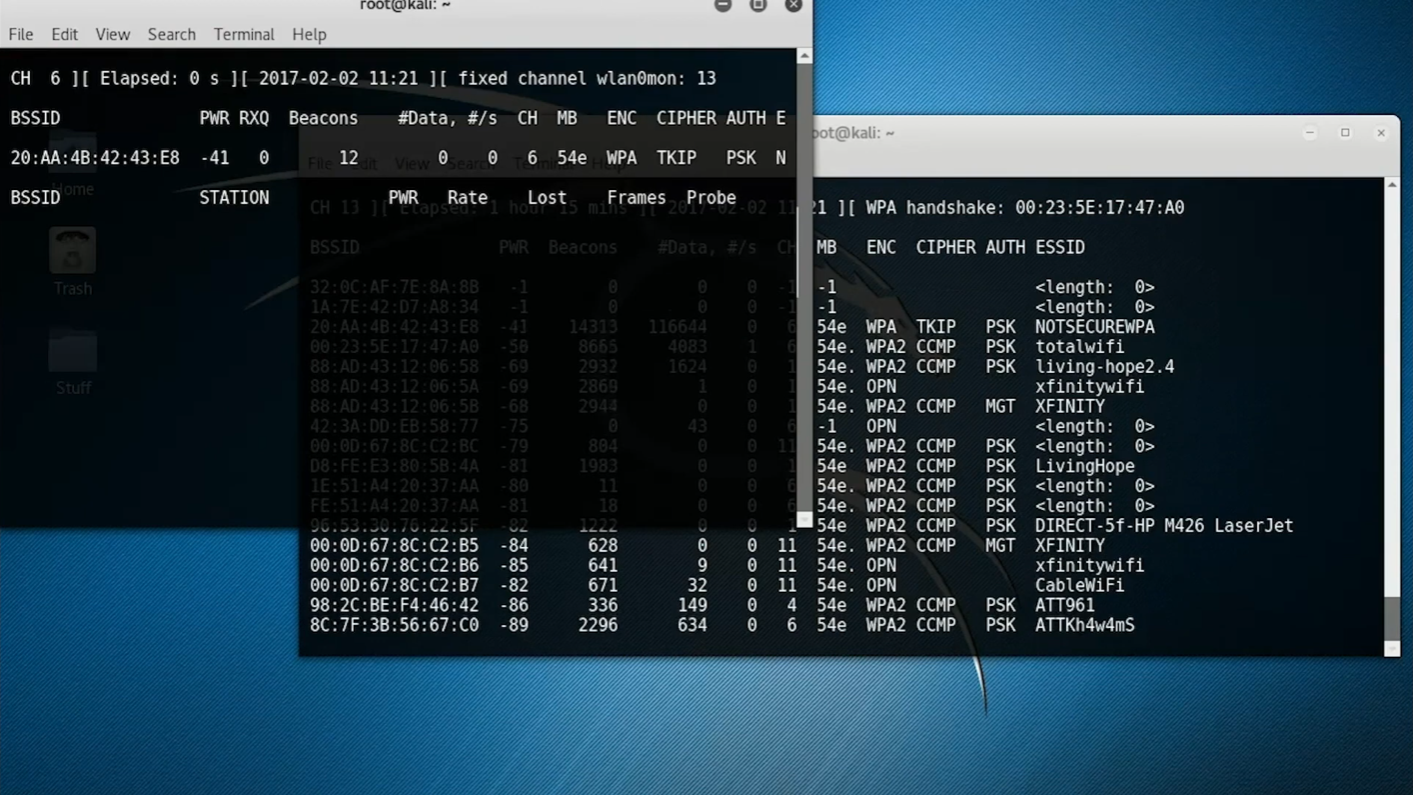
Airodump-ng is limited to the authorized access point and writes captured frames to a file.

Take your hacking to the next level
Learn how to pentest and be an ethical hacker with expert-guided training, or learn more about the world of ethical hacking.
Step 3: Confirm that the authentication data was captured
Airodump-ng continues monitoring the selected access point while clients connect.
When suitable WPA/WPA2 authentication traffic is captured, Airodump-ng may display a handshake indicator near the top of the terminal. The tester should also verify that the capture file was written successfully.
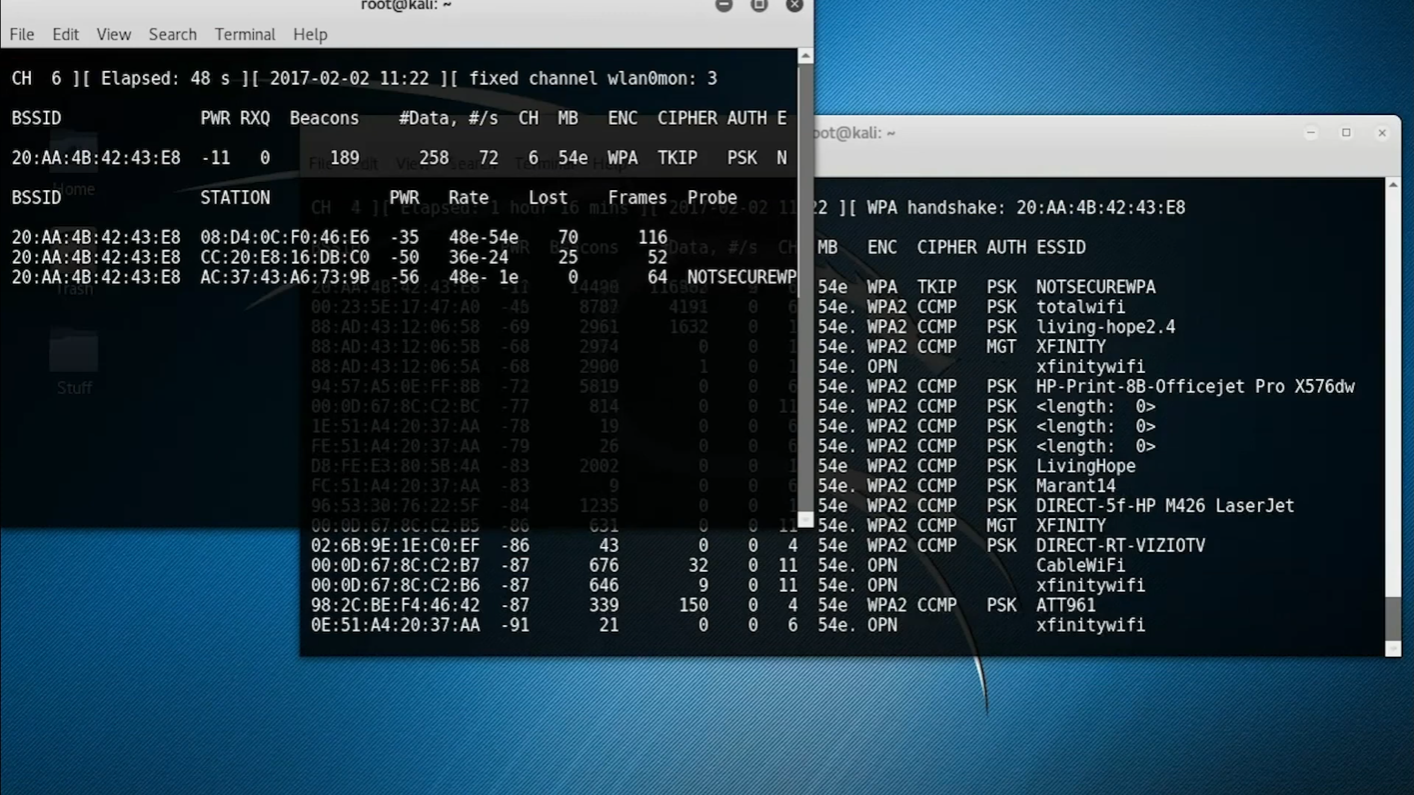
Airodump-ng indicates that authentication traffic from the lab network has been captured.
A handshake indicator does not mean that the password has been recovered. It means the capture may contain the data needed to verify candidate passwords.
Capture quality matters. An incomplete or invalid exchange may not provide enough information for a successful test.
Step 4: Review the capture files
After stopping the capture, the demonstration checks the working directory:
lsThe expected output includes the wordlist and a capture file, such as:
dictionary.txt
wpafile-01.cap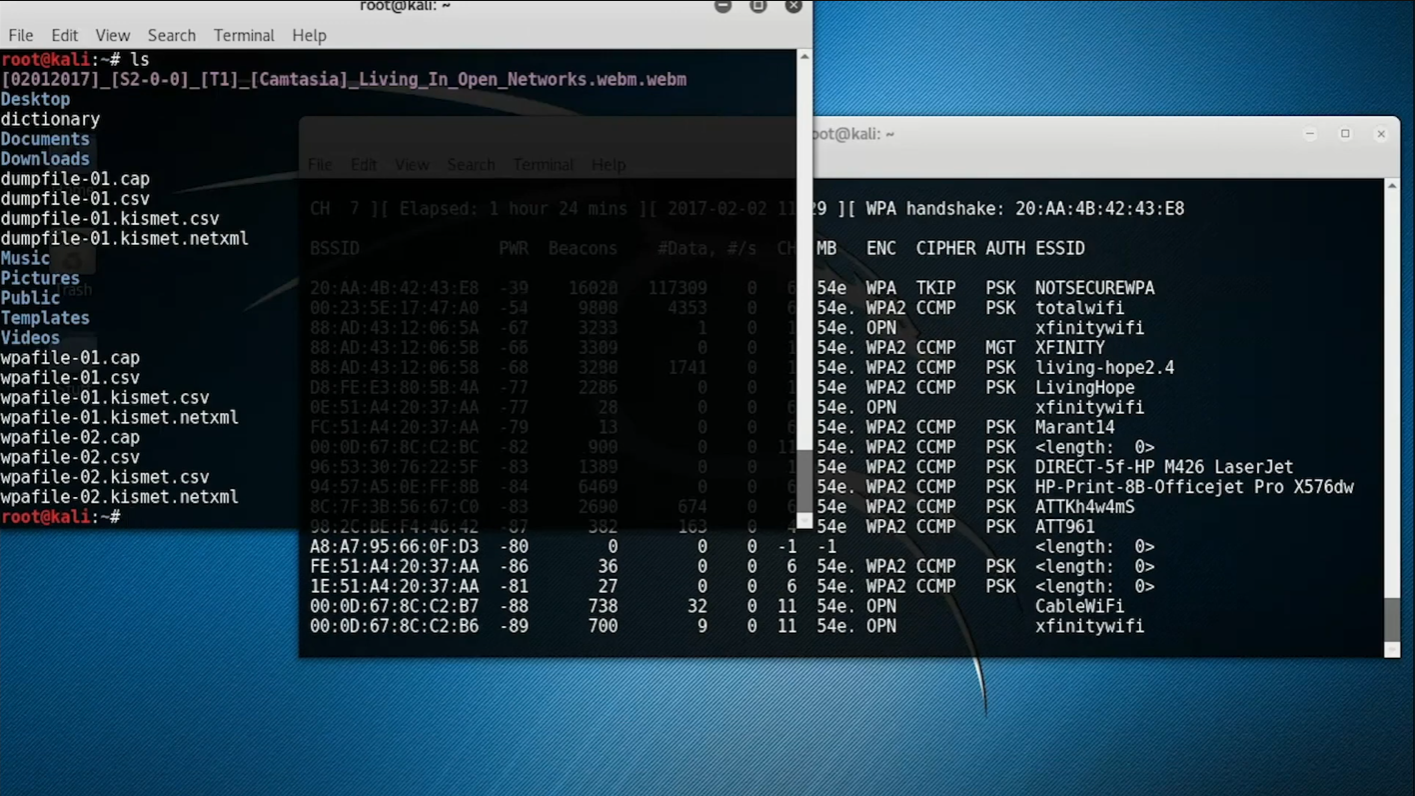
The lab directory contains the password wordlist and the saved packet capture.
The wordlist should contain only authorized test candidates. Avoid storing sensitive production passwords or unrelated credential data in a training environment.
Step 5: Test candidate passwords with Aircrack-ng
Video timestamp: 6:30–7:31
The password-testing command should use Aircrack-ng:
aircrack-ng -a 2 -w dictionary.txt wpafile-01.capCommand reference
aircrack-ng: Starts the key-recovery and password-testing component of the Aircrack-ng suite.
-a 2: Selects WPA/WPA2 pre-shared-key attack mode.
-w dictionary.txt: Specifies the file containing candidate passwords.
wpafile-01.cap: Specifies the capture file containing the authentication data.
Airodump-ng performs the packet capture; Aircrack-ng performs the offline password test. Aircrack-ng’s WPA/WPA2 workflow applies to pre-shared-key authentication, not every form of WPA authentication.
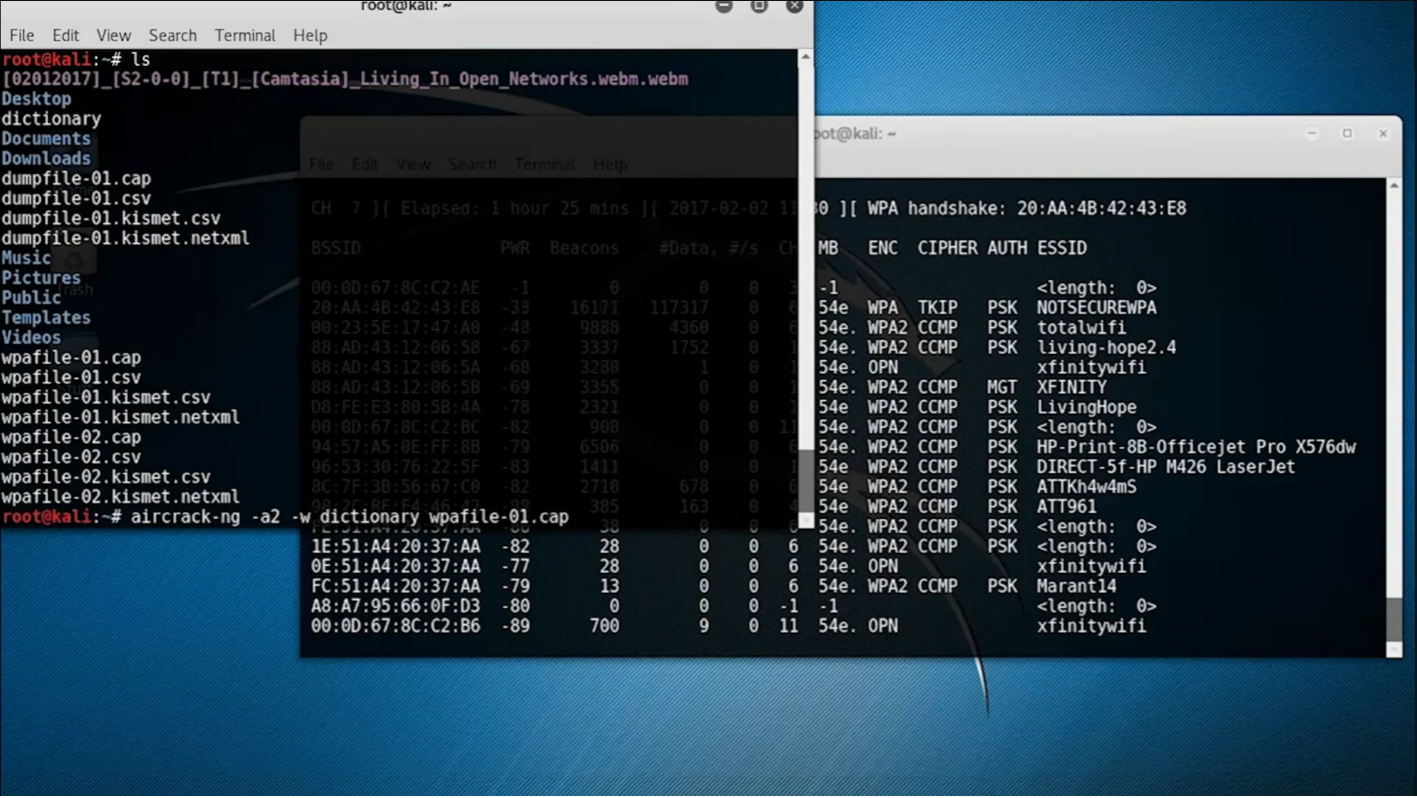
Aircrack-ng tests candidate passwords from the demonstration wordlist against the saved WPA capture.
Why the password is recovered so quickly
Video timestamp: 7:32–8:17
The demonstration password is:
timmytimmyThat exact password was deliberately included in the demonstration wordlist. Aircrack-ng therefore finds it quickly.
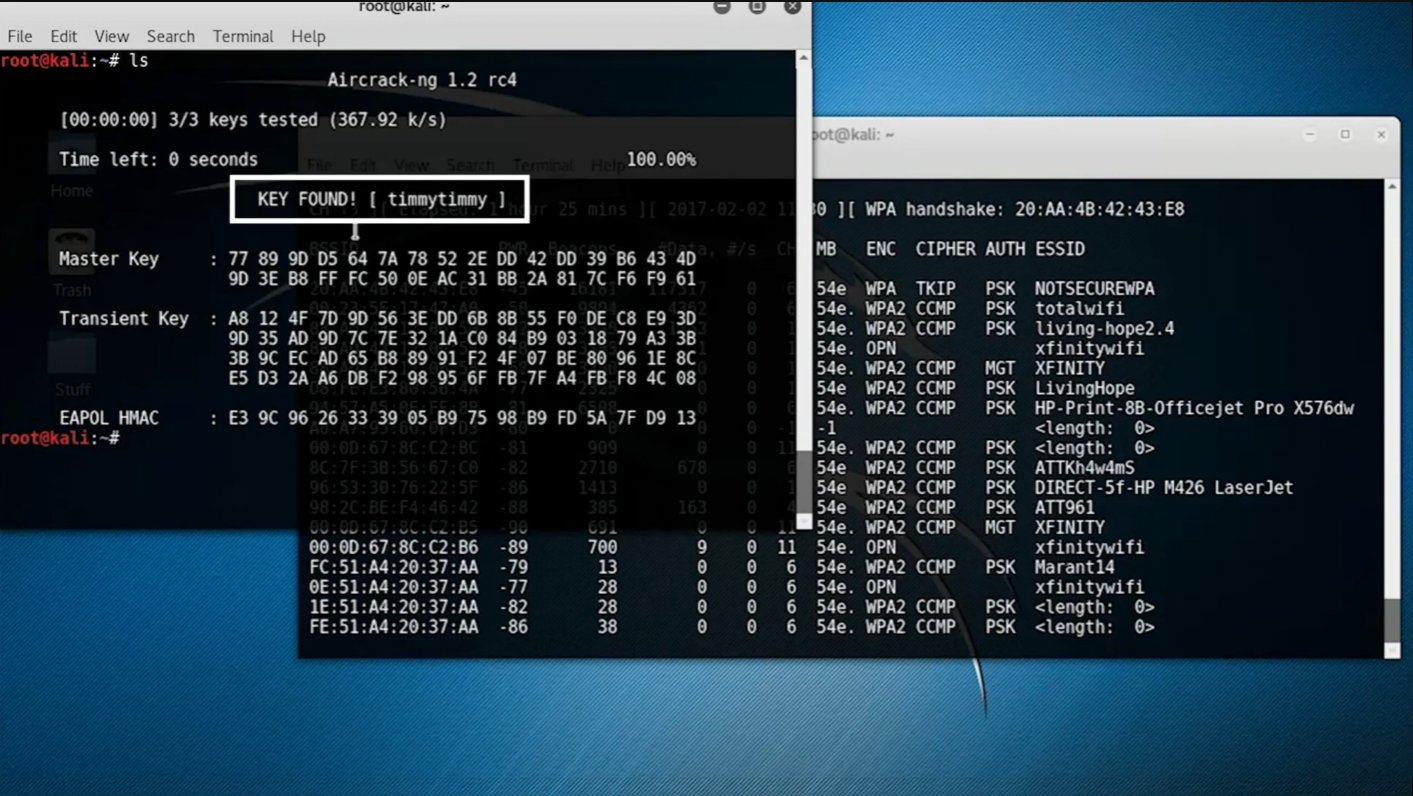
Aircrack-ng finds the intentionally weak lab password because it appears in the supplied wordlist.
The result should not be interpreted to mean that every WPA2 password can be cracked quickly. The time required depends on various factors, including:
- Whether the capture is valid
- Whether the correct password is in the wordlist
- The number of candidates being tested
- The complexity of the password
- The processing resources available
- Whether additional password-generation rules are being used
A password that is long, unique and absent from predictable password datasets may be computationally impractical to recover through this method.
WPA2 vs. WPA3: What has changed?
WPA3 was designed to strengthen Wi-Fi security and address limitations in earlier generations of wireless protection.
WPA3-Personal and SAE
WPA3-Personal uses Simultaneous Authentication of Equals, or SAE, instead of the traditional WPA2-Personal pre-shared-key exchange.
SAE provides stronger protection against password-guessing attempts. Capturing a WPA3-SAE authentication exchange does not enable the same straightforward offline wordlist test demonstrated in this WPA/WPA2 walkthrough.
This does not make WPA3 invulnerable. Weak passwords, implementation defects, outdated firmware and poor network configuration can still create risk. However, WPA3-Personal raises the cost of password guessing and provides stronger default protections than legacy WPA or WPA2-Personal configurations. The Wi-Fi Alliance states that WPA3-Personal offers increased protection against password-guessing attempts.
Protected Management Frames
WPA3 requires Protected Management Frames for WPA3 connections.
Protected Management Frames protect certain wireless management frames against forgery and help prevent spoofed deauthentication and disassociation messages from forcing clients off the network. They do not prevent every rogue-access-point or evil-twin attack.
WPA2/WPA3 transition mode
Some routers offer a transition mode so WPA2-only and WPA3-capable devices can use the same network.
Transition mode can be useful for compatibility, but it may preserve exposure associated with older WPA2 clients and configurations. Organizations should identify legacy devices, update or replace them where possible, and move to WPA3-only operation when their environment supports it.
What is KRACK?
KRACK stands for Key Reinstallation Attack. It is different from the dictionary-based password test demonstrated in this article.
KRACK manipulates and replays messages in the WPA2 handshake so that a device reinstalls an encryption key that is already in use. This can reset values that should not be reused and, under affected conditions, enable packet replay, decryption or forgery.
Does KRACK reveal the Wi-Fi password?
No, KRACK does not recover the network’s Wi-Fi password, and changing the Wi-Fi password alone does not correct an unpatched KRACK vulnerability.
The primary response is to install applicable security updates on Wi-Fi clients and network equipment. Organizations should replace devices that are no longer supported by their manufacturers.
KRACK should also not be confused with the Aircrack-ng wordlist test shown above:
- Dictionary testing: Attempts to find a weak WPA/WPA2-Personal password.
- KRACK: Exploits vulnerable handling of encryption keys during a handshake.
- WPA3-SAE: Uses a different authentication approach designed to resist straightforward offline password guessing.
How to protect a Wi-Fi network in 2026
Wireless security depends on more than one setting. Use several defensive layers for effective protection.
For home networks
- WPA3-Personal is preferred when all important devices support it. Otherwise, use WPA2 with AES-CCMP.
- Do not use WEP, WPA1 or TKIP.
- Use a long and unique Wi-Fi passphrase. Do not base the passphrase on names, addresses, dates or familiar quotations.
- Update the router’s firmware and enable automatic updates when available.
- Update phones, laptops, smart-home devices and other Wi-Fi clients.
- Disable Wi-Fi Protected Setup, or WPS, when it is not required.
- Replace routers and connected devices that no longer receive security updates.
- Create a separate guest network for visitors.
- Place untrusted or poorly supported smart devices on a separate network.
- Use HTTPS and end-to-end encryption for sensitive communications.
For organizations
- Opt for WPA3-Enterprise for environments that support it.
- Use individual identities rather than a widely shared pre-shared key.
- Protect certificate validation and enterprise authentication configuration.
- Enable Protected Management Frames where supported.
- Separate employee, guest and Internet of Things networks.
- Apply client isolation where appropriate.
- Monitor for unauthorized access points and suspicious wireless activity.
- Rotate shared credentials when personnel or device access changes.
- Maintain an inventory of access points, wireless controllers and client devices.
- Patch both network infrastructure and endpoints.
- Retire unsupported hardware.
- Document and periodically reassess WPA2/WPA3 transition-mode dependencies.
Take your hacking to the next level
Learn how to pentest and be an ethical hacker with expert-guided training, or learn more about the world of ethical hacking.
Build hands-on ethical hacking skills
This demonstration illustrates one part of wireless security testing: how weak WPA/WPA2-Personal passwords can be identified from captured authentication data.
The broader lesson is that strong security comes from layers:
- Modern Wi-Fi protocols
- Long and unique credentials
- Current firmware
- Supported devices
- Segmented networks
- Secure application traffic
- Authorized testing
Start learning the skills in this roadmap with our free hacking workshop. Practice in a controlled training environment while developing techniques you can apply throughout your cybersecurity career.
Frequently asked questions
Can WPA2 passwords still be cracked?
Weak WPA2-Personal passwords can still be discovered through offline password testing when an attacker obtains suitable authentication data and the correct password appears in the candidate search space. A long, unique and unpredictable passphrase is much more resistant to this technique.
Does this Aircrack-ng method work against WPA3?
Not in the same way. The walkthrough demonstrates password testing against WPA/WPA2-Personal pre-shared-key authentication. WPA3-Personal uses SAE, which is designed to resist the straightforward offline guessing process shown here.
What is the difference between Airodump-ng and Aircrack-ng?
Airodump-ng captures and records wireless traffic. Aircrack-ng analyzes compatible captures and tests candidate keys or passwords.
In this walkthrough:
- Airodump-ng creates the .cap file.
- Aircrack-ng tests the wordlist against that file.
How long does it take to test a WPA2 password?
It may take seconds, days, years or far longer.
The outcome depends primarily on password strength, the candidate list, the capture quality and the available processing resources. A quick result usually indicates that the password was weak and appeared early in the tested wordlist.
Is it legal to test a Wi-Fi network?
Testing a network you own is generally different from accessing or intercepting another party’s network. Laws and contractual rules vary by jurisdiction. Obtain explicit written authorization and a clearly defined scope before conducting a security assessment.
Author Details

Bianca Gonzalez